Monday, 23 March 2015

F452 - Installation routines

1) The program/executable is copied to a designated folder/directory/memory location.
2) The user must agree to an End User License Agreement (EULA).
3) Any necessary data files (DLLs) are copied.
4) Shortcuts and icons are created.
5) The user can configure settings.
6) Configuration settings are saved in a file.

Monday, 16 March 2015

F451 - networking/ error checking

Data echoing:

  • Data is sent to the receiver, the receiver transmits the signal back to be checked by the sender.
    • Reliable but inefficient.

Parity checking:

  • Odd or even.
  • The last bit of a byte is used to make the byte have an even or odd number of 1s.

Check sum:

  • The last digit is used to check.

F451 - system software lifecycle/ DFDs

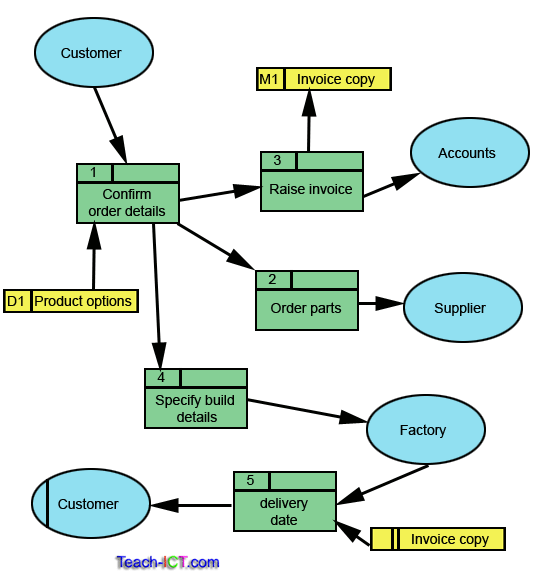
Data flow diagrams:


  • Shows how data moves through a system.
  • Data flow [ arrows ]
  • Process [ rectangles ]
  • External entities [ circles ]
  • Data store [ little rectangles ]


F451 - knowledge based systems


Knowledge based systems:


  • Knowledge base:
    • Consists of tasks/rules about the task domain.
    • Specialised around a particular domain/ non generic.

  • Inference engine:
    • Follows decision tree from user input data.
    • Heuristics/ guess work/ fuzzy logic. 
    • eg: wolfram alpha
  • User interface:


F451 - networking

Peer-to-Peer

//eg: Torrents; Skype; bbc iplayer;

Client-server 

//eg: Windows networks;

Network managers:

  • Monitor the network, 
  • Install software, 
  • Manage access, 
  • Building and configuring new hardware

Wednesday, 11 March 2015

F451 - Implications of Computer Use

Ethics is a set of moral principles that govern the behaviour of a group or individual.
Computer ethics is a set of moral principles that regulate the use of computers.

Issues of computer ethics include:

  • Intellectual property rights such as copyrighted electronic content. 
  • Privacy concerns. 
  • How computers affect society.

Intellectual:

  • You have certainly heard the word property before: it is generally used to mean a possession, or more specifically, something to which the owner has legal rights.
  • You might have also encountered the phrase intellectual property. This term has become more commonplace during the past few years, especially in the context of computer ethics. But what exactly does it refer to? 

Intellectual property: 

  • Refers to creations of the intellect (hence, the name): inventions, library and artistic works, symbols, names, images and designs used in commerce are a part of it.
  • Is usually divided into two branches, namely industrial property which broadly speaking protects inventions and copyrights, which protects literary and artistic works.
*came about with the invention of the printing press (Charles II was concerned)

Netiquette:

"Netiquette,[1] a colloquial portmanteau of network etiquette or Internet etiquette, is a set of social conventions that facilitate interaction over networks, ranging from Usenet and mailing lists to blogs and forums." - copied straight from wikipedia

Avoid spamming:

  • Spamming is sending unsolicited bulk and/or commercial messages over the internet. 

Creation of Worms and Computer Virus

  • Morally bad when it is intended for malicious purposes like to steal information or destroying of data.
  • However, it could be used like a vaccine - poison to kill another poison - fire to fight fire - robot tiger wizards to duel wizard tiger robots - italian plumbers to evade various flora and fauna.

Effect of Computers:


  • Economic
    • Businesses no longer lose work because of employees taking sick leave, or due to poor weather conditions, as they can work from home.
    • Businesses can trade internationally with ease thanks to e-commerce and the internet.
    • Work can be outsourced easily - it doesn't make a difference if a worker is connecting to the office from the same town or the other side of the world.
    • Worker can be more easily distracted by other websites (such as facebook).
  • Social
  • Legal
  • Ethical
  • Environmental
//i will fill these in, don't worry

Monday, 23 February 2015

Recursion. BWAAAAM


  • A method or function that calls itself.
  • A type of iteration or looping.
  • Must have a stopping condition.(To prevent endless loops)


Two types: 


  • Tail: when the last thing that happens is the recursive call.
  • Head: when it happens first.
Some situations in programming can only be solved with recursion. (e.g.: displaying a list of files within a directory structure)

Factorial
multiplication of every value between zero and itself.

F452 File handling

Serial file:

  • Data is stored in the order that it is added.
  • This is known as 'appending' the data.

Sequential file:

  • Data is stored according to a key field.
  • When writing data to a sequential file all subsequent records need to be moved.
  • File modes:
    • -Append
    • -Create
    • -CreateNew
    • -OpenOrCreate
    • -Read
    • -ReadWrite
    • -Write

Indexed sequential file:

  • Data is arranged according to a key field but uses an index which can find records directly.

Random files:

  • Allow data to be stored anywhere in a dedicated section of a disk.
  • A hash algorithm (calculation) is performed on a field in the record to be stored.

Size estimation:

  1.  Determine the size in Bytes of each field.
  2.  Add the field sizes.
  3.  Multiply by number of records.
  4.  Add 10% to the result for additional storage/ overhead.

Wednesday, 11 February 2015

F451 - Software answers

Sage Instant [Payroll Explore]:

  • Accounting software.
  • Keeps track of income and would be used by employers.
  • Provides templates for easy use. 
  • Another example: Matlab.
AutoDesk [AutoCAD LT 2014]:
  • CAD prototyping software.
  • Used by designers to design.
  • Provides easy to use tools and help to illustrate designs.
  • Another example: Google SketchUp.
 Microsoft Visual Studio:
  • Integrated development environment (IDE).
  • Used to write code; used by developers.
  • Compiles code & has funky build tools.
  • Another example: Python 3.3.4 IDE.
InfinityQS [ProFicient]:
  • Statistical analysis software.
  • Used to store data and produce visual representations for businesses.
  • Accumulates data.
  • Another example: ADaMSoft.
NCR [CounterPoint]:


F451 - TCP/IP


  • TCP/IP is a set of protocols developed to allow cooperating computers to share resources across a network.
  • TCP stands for Transmission Control Protocol.
  • They are Transport Layer and Network Layer protocols in OSI model.
  • The most well known network that adopted TCP/IP is --> Internet (the biggest WAN)
  • Supported by UNIX operating system.

F452 - Arrays 'n' stuff.

3 properties of a 1 dimensional array:


  • List of elements of a specific type.
  • Can be used in an expression.
  • Contiguous block of memory.
  • Relatively efficient (not entirely guaranteed).
  • Typed.
  • Has an identifier.
  • Indexes (mainly 0 based0).
  • Fixed size.


2D array:

Row then column.
2 columns.

A      B
[0,0],[1,0],
[1,0],[1,1],

[2,0],[2,1],


List:

Efficient and dynamic data type.

Dictionary:
This is an implementation of a hash table: an extremely efficient way to store keys for lookup.
A dictionary is fast, well designed and reliable.
Example: dict["string"];

ArrayList:
Found in systems.collections. Can have different data types.

Stack:
Sequential stack where data is pushed and popped to the top of the stack.

Queue:
This removes elements that were added first (FIFO, first-in-first out). So we keep items in order.

Sets:
The hashset implements set logic in its many instance methods. We use methods such as Union on different HashSets to solve problems. This makes some programs simpler.
F452 - Basic data types or Primitives.

Numeric data types:
Integer.
Real.

Alphanumeric data types:
Char.
String.

Boolean:
True or False

F451 - Internet Protocol


  • IP stands for Internet Protocol.
  • IP specifies the format of packets, also called datagrams, and the addressing scheme. Most networks combine IP with a higher - level protocol called Transmission Control Protocol (TCP), which establishes a virtual connection between a destination and a source.
  • TCP establishes a connection between 2 hosts so that they can send messages back and forth for a period of time (duplex).

Purpose:


  • Need a standard means of communication between devices.
  • Can't communicate if speaking 2 different languages.
  • The IP defines the basic unit of data transfer (IP diagram).
  • IP software performs the routing function.
  • IP includes a set of rules that process the idea of unreliable packet delivery.

What is protocol? 

  • Rules and conventions explaining how something must be done.
  • Used to describe how devices can communicate.

Each datagram has 2 components:

  • Header 
  • Payload
Please - physical
Dear - data link
Never - network
Try - transport
Stealing - session
People's - presentation
Apples - application

IP supports the following following services:
  • One-to-one (unicast)
  • One-to-all (broadcast)
  • One-to-several (multicast)

Physical Layer:

  • This layer deals with the Hardware of network.

Data Link Layer:

  • This layer deals with MAC addresses of devices.
  • Responsible for physical addressing, error correction & preparing the information for the media frames.

Network Layer:

  • This layer deals with Packets (data bundles).
  • Responsible for logical addressing and routing.

Transport Layer:


  • This layer deals with segments.
  • Breaks information into segments and is responsible for connection & connectionless communication.
  • Hardware: proxy server, gateways, firewall,...

Session Layer:

  • Responsible for establishing, managing & terminating user connections.
  • Acknowledgements of data received during a sessions.
  • Retransmission of data if it is not received by a device.

Presentation Layer:

  • Allows hosts & applications to use a common language.
  • Performs..
    • Data formatting.
    • Encryption & Decryption for security.
    • Compression & Expansion.

Application Layer:

  • This layer is what the user sees. 
  • Provides Interface for users to communicate with applications.

IP - Internet protocol.
ARP - Address Resolution Protocol.
ICMP - Internet Control Message Protocol.

IP address:


  • An IP address is a unique global address for a network interface.
  • Is a 32 bit long  identifier.
  • Encodes a network number (network prefix) and a host number.
  • In high-order bit is set to 0, the next seven bits complete the network ID, the remaining 24 buts represent the host ID.
  • The 2 high order bits in class B are set to 10, the next 14 are used to complete the network ID, the remaining 16 bits represent the host ID.

Subnetting:


  • Subnetting enables the network administrator to further divide the host part of the address into 2 or more subnets.
  • In this case, a part of the host address is reserved to identify the particular subnet.
  • This is easier to see if we show the IP address in binary format.

Journey to IP versions: 

  • IPV(1-3) : 
    • Were not formally assigned.
  • IPV4 : 
    • TCP/IP, 32 bit IP address currently used.
  • IPV5 : 
    • Internet stream protocol (SP).
  • IPV6 : 
    • Designed to replace IPV4, 128 bit IP address.


F451 - Switching and Routing

Switching:

  • Path set up at connection time.
  • Simple table look up.
  • Table maintenance via signaling.
  • No out of sequence delivery.
  • Lost path may lose connection.
  • Much faster than pure routing.
  • Link decision made ahead of time, and resources allocated then.

Routing:

  • Can work as connectionless.
  • Complex routing algorithm.
  • Table maintenance via protocol.
  • Out of sequence delivery likely.
  • Robust: no connections lost.
  • Significant processing delay.
  • Output link decision based on packet header contents - at every node.


F451 - packet switching


  • Protocols in which messages are split up into packets before they are sent. 
  • Each packet is then transmitted individually and can even follow different routes to its destination. 
  • Once all the packages forming a message arrive at the destination, they are recompiled into the original message.

  • A typical upper bound on packet size is 1000 octets.
  • If a station has a longer message to send it is broken into a series of small packets. Each packet contains part of the user's data and some control information.
  • The control information should at least contain:
    • Destination Address
    • Source Address
  • Store and forward - packets are received, stored briefly (buffered) and past on to the next node.

Advantages:

  • Line efficiency
    • Single node to node link can be shared by many packets over time.
    • Packets queued and transmitted as fast as possible.
  • Data rate conversion
    • Each station connects to the local node at its own speed.
    • Node buffer data if required to equalize rates.
  • Packets are accepted even when network is busy
    • Delivery may slow down
  • Priorities can be used.

Switching technique:

  • Packets are handled in two ways:
    • Datagram
    • Virtual circuit

Datagram:

  • More flexible
    • Routing can be used to avoid congested parts of the network.
  • No call setup phase
    • Better if few packets

Virtual circuits:

  • Network can provide sequencing and error control.
  • Packets are forwarded more quickly
    • No routing decisions to make
  • Less reliable
    • Loss of a node looses all circuits through that node

Monday, 9 February 2015

F452 ch6 testing

Black box testing (functional testing): 
  • Different sets of input data are tested to see if they produce the expected outcome.
  • Sets of data are picked to represent certain scenarios.
    • Example: Checking age inputs between 0 & 100; valid data include 8, 76 & 50; invalid data include 600, 109 or -5; borderline data 

White box testing (structural testing):
  • The algorithm i the code is tested ti check that all parts of the code to check that all parts of the code work as intended.
  • Every possible route or path of execution through the program is identified and tested.
    • *key difference: white box testing requires access to the code and to be able to understand it.
Alpha testing:
  • Partially complete with lots of bugs.
  • Carried out within the company.
  • Any bugs are identified and quickly fixed.
Beta testing:
  • Nearly complete and is released to potential users outside the company.
Acceptance testing:
  • Program is now complete and it is demonstrated to the end user. The purpose is to show that it works correctly and all desired features are implemented.
  • The program is tested against the requirements which were agreed between the user & the programmers. 
Bottom up testing:
  • Each individual module is tested as soon as it's written using pre-prepared testing data.
  • Test data:
    • Normal data.
    • Extreme values.
    • Incorrect data.
Top down testing:
  • The skeleton of the complete system is tested, with individual modules being replaced by stubs which display a message is a procedure is executed.
Integration testing:
  • When all modules have been tested individually they need to be tested together.

F452 Modular Programming


Description:

  • Each stage in development is completed in blocks/modules
  • The initial problem is separated into smaller subtasks, tasks are split until a solution can be written. This process is called stepwise refinement.
  • One needs a clearly defined interface so that one can expect an outcome.
  • The contract between modules is defined in the interface definition.

Advantages:

  • Smaller problems are easier to solve, test and understand.
    • Debugging is also easier.
  • Changes that need to be made are easier to plan.
  • Modules can be built by separate teams.
  • Code can be written in different languages.
  • Modules can be rewritten (ctrl c, ctrl v).

Disadvantages:

  • Integration of modules.
  • Clashes, eg using different version of a library.
  • Testing the interface.


Thursday, 5 February 2015

F451 networking

DNS: (Domain Name Service) returns IP.

Packets: Datagram; contents of envelop.

Router: Postman.

IP: Address/ stamp.

OSI model: Open Standard Institute.


Wednesday, 4 February 2015

F451 data transmission

LAN: Local Area Network

WAN: Wide Area Network

NIC: Network Interface Card

Network Hardware:


  • Routers
  • Servers
    • Printer servers
    • File servers
    • Email servers
  • Bridges
  • Gateways

How is data transmitted?

Binary numbers are sent as either electronic pulses or fibre optic light beams.

Methods of Transmitting:

Serial: one wire, one bit at a time.

Parallel: multiple wires, to transmit more data.

Simplex: One direction, eg one direction are simple minded.

Duplex: Both directions simultaneously, eg phone.

Half Duplex: Both directions - one at a time, eg walkie talkie.

Handshaking:

  • Signal sent between 2 devices to ensure they are both ready to communicate.
  • 1st device sends a handshake signal which is acknowledged by the other device.
  • This states that each is now ready for communication.

Bit rates:

  • Rate of bits that can be sent in 1 second.
  • Measured in Baud.

High Bit Rate:

  • A streaming video watched over a network would require a high bit rate.
  • Large amount of data being transferred.
  • Watching a video is time sensitive.
  • A low bit rate will result in buffering.

Transmission errors:

  • Binary numbers can be corrupted during transmission.
  • Echoing back.
  • Parity.
    • Odd & even (number of ones).
  • Check sum.
  • Part of the transmission protocol.

TYPES OF NETWORK:

  • Bus: 
    • Can function with a broken computer.
    • If main connection fails it all goes to goop.
  • Ring: 
    • If one computer breaks the whole ring breaks.
    • Cheap fast.
  • Star: 
    • Most common kind of network.
  • Mesh:
    • //pending
  • Tree:
    • //pending
  • Line: 
    • Each computer connected to each other in a 'line'.
    • If one goes down they all do.
  • Fully connected:

    • All parts connected directly.


Monday, 19 January 2015

F452 installing


  • Availability is important.
    • Internet download? Drag and drop files? Installation routines (complex programs)? Building from source?

Installation routine:

  1. Copy executable program onto the users computer.
  2. Copy and/ or prepare any other files that are needed by the computer.
    • Sometimes the latest version will be downloaded from the internet.
    • Sometimes they are created the first time the program is used by a user.
  3. Copy and register any library files that are required by the program.
    • This might include making system level changes with the registry.
  4. Add icons, menu items and short cuts as requested by the user.
  5. Configure user preferences, eg language.


Exam example:

Explain what an installation routine does:
  • The installation routine would provide terms and conditions.
  • An installation routine copies executable software onto the computer from the CD-ROM.
  • The routine should ask the user as to where to allocate the file(s) and later enquire as to whether they would appreciate icons/ shortcuts in the menu.
  • Configuration is saved in a file.
  • Programs may need to be extracted from a compressed file.
  • User has the opportunity to configure settings.
[*don't be a pleb: write in prose]